
Tabung Bersama Mu

Blog Widget by LinkWithin
Showing posts with label Blogspot. Show all posts

Monday, October 26, 2009

Walking Picture On Blog

Holla... Tonight I Gonna Lets U Know How To Make a "Walking Photo On Blog Header" Or Sidebar...
Thanks To ikanstim Cause asking Me How To Do it..
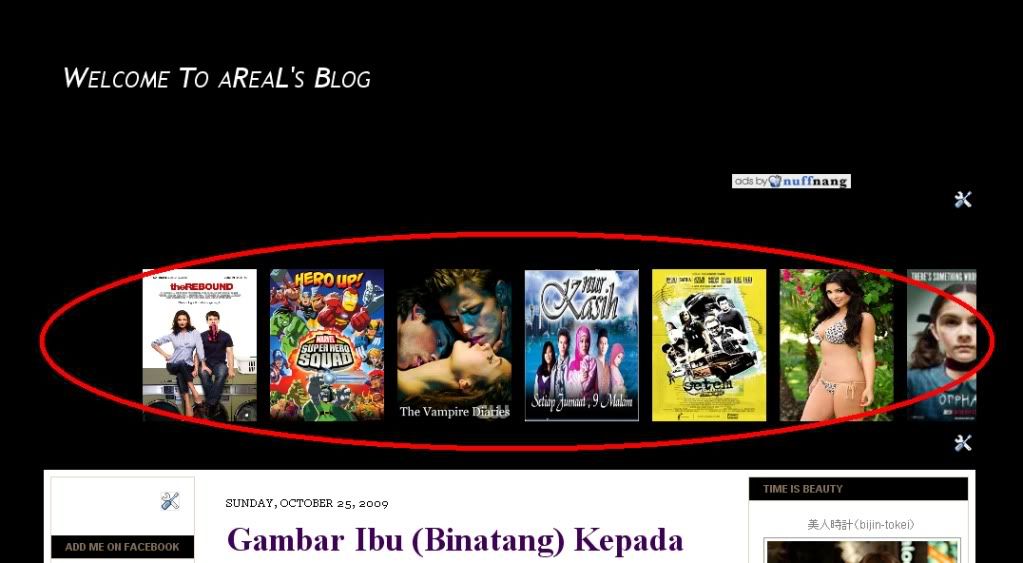


1.Logon Your Blogspot.
2.Go To Dashboard,Layout,Add a Gadget And Click HTML/JavaScript
3.Copy and Paste Below Code

<marquee behavior="scroll" direction="left" onmouseover="this.stop()" scrollamount="7" onmouseout="this.start()" align="middle">

<a danger="" href="Site URL" title="Title"><img alt="#" width="120" src="Picture link" height="160"/></a> <a danger="" href="http://tanyaareal.blogspot.com/2009/10/thesuperherosquadshows01e01andloapilots.html" title="New Movie Update"><img alt="#" width="120" src="http://www.comicbookmovie.com/images/users/uploads/10204/dealio%20-%20super%20hero%20sqaud2.jpeg" height="160"/></a>
</marquee>

4.Change RED Code To Your Link, Title & Photo
5.Done...

[...]

Saturday, September 5, 2009

Google Webmaster Tools

Add Google Webmaster Tools to Your Blogger Blog

Using SEO To Be Perceived As The Expert

So your goal is to project upon your sites visitors that you are the recognized authority in your industry. How better than to have your site rank number one for a top keyword in that industry. But hold on, one step at a time! Lets talk tracking. We need to be able to track our websites progress as we make changes and market. Lets get stated with one of my favorite tools to add to any site, Google Webmaster Tools (oh, and its totally free.)

Why Blogger?
I will be applying Google Webmaster Tools to a Blogger blog in this example for two reasons. One, it's easy, and two if you want more information about Blogger and getting your own blog I have tons of resources that will get you up and running in no time. This tutorial can be applied to any website, not just Blogger. You need this added to your site, make it a "tracking" requirement!

You can get 118 Blogger video training lessons at Magic With Blogs

Lets get started!
So my goal here is to be able to see some detailed information directly from Google about my blog. For example:

1) Keywords I'm currently ranking for.
2) Keywords that are being clicked through.
3) View errors Google encounters when crawling my blog/website.
4) See how often Google is crawling my blog/website.
5) View incoming and outgoing links to my blog/website.
6) Force Google to add or remove www. from my blog/website SERP listings.
7) Apply the "advanced image search" feature to my blog.
and much more...

First off, backup your Blogger template or website before we get started.
(You should be doing this anyway! )

Secondly go to

http://www.google.com/webmasters/tools/
If you are signing in for the first time with your Google account click continue as noted in the graphic below.


Now we need to tell Google about our site.

1) To begin, type the URL of your blog/website where noted in the graphic below (callout 1.) Example: Advanced Blogger Statistics Setup
2) Next, click "Next" (callout 2.)


Next we need to verify our site. This is so that we can view statistics about our blog/website.
So next up we need to verify. Click "Verify Your Site" as noted in the graphic below.


Now we need to choose a verification method. We do not have FTP/File access (with Blogger) so we are going to need to verify using a Meta tag. If you do have access you can use the other method, but for this example we will be adding a meta tag to our home page.

So change (callout #1 in the graphic below) "Choose Verification Method..." to "Add a Meta tag."


Ok, now you should see a Meta tag we need to add to verify our blog/website with Google (See the graphic below.) Save the tag as we will need it in a few steps. My tag is (yours will be different):


Blogger Specific Stuff
Alright, now we need to open a new window and navigate over to our Edit HTML section of our blog. (DO NOT CLOSE THE PREVIOUS WINDOW, OPEN A NEW ONE. Yes, you can get back to it, but just leave it open for this tutorial )

1) Go to

http://www.blogger.com/
2) Sign-in and go to your blogs control panel.
3) Click on "Template" (Callout 1 in the graphic below)
4) Then click "Edit HTML" (Callout 2 in the graphic below)


Now that we have both our verification code saved from before, and we are in the blogger "Edit HTML" section of the blog we wish to get more information on, we can place the verification code.

1) Find the "" tag in your template. (Callout 1 from the graphic below)
2) Place the code you copied from Webmaster Tools directly below the tag. (Callout 2 from the graphic below)
3) Scroll to the bottom of the page and click "Save Template"


Now with the Verification code properly placed and saved we can complete the verification process.

Go back to the Webmaster Tools window (you left it open right?) and click the verify button as noted in the graphic below.


Congratulations!

Your site is now verified and you can use Google Webmaster Tools to see advanced information about your blog.


Click "nang it!" Button To Vote For This Post. Thank You...!
[...]

Friday, August 28, 2009

How to get traffic for your blog

1. Use lists.
2. Be topical... write posts that need to be read right now.
3. Learn enough to become the expert in your field.
4. Break news.
5. Be timeless... write posts that will be readable in a year.
6. Be among the first with a great blog on your topic, then encourage others to blog on the same topic.
7. Share your expertise generously so people recognize it and depend on you.
8. Announce news.
9. Write short, pithy posts.
10. Encourage your readers to help you manipulate the technorati top blog list.
11. Don't write about your cat, your boyfriend.
12. Write long, definitive posts.
13. Write about your kids.
14. Be snarky. Write nearly libelous things about fellow bloggers, daring them to respond (with links back to you) on their blog.
15. Be sycophantic. Share linklove and expect some back.
16. Include polls, meters and other eye candy.
17. Tag your posts. Use del.ico.us.
18. Coin a term or two.
19. Do email interviews with the well-known.
20. Answer your email.
21. Use photos. Salacious ones are best.
22. Be anonymous.
23. Encourage your readers to digg your posts. (and to use furl and reddit). Do it with every post.
24. Post your photos on flickr.
25. Encourage your readers to subscribe by RSS.
26. Start at the beginning and take your readers through a months-long education.
27. Include comments so your blog becomes a virtual water cooler that feeds itself.
28. Assume that every day is the beginning, because you always have new readers.
29. Highlight your best posts on your Squidoo lens.
30. Point to useful but little-known resources.
31. Write about stuff that appeals to the majority of current blog readers--like gadgets and web 2.0.
32. Write about Google.
33. Have relevant ads that are even better than your content.
34. Don't include comments, people will cross post their responses.
35. Write posts that each include dozens of trackbacks to dozens of blog posts so that people will notice you.
36. Run no ads.
37. Keep tweaking your template to make it include every conceivable bell or whistle.
38. Write about blogging.
39. Digest the good ideas of other people, all day, every day.
40. Invent a whole new kind of art or interaction.
41. Post on weekdays, because there are more readers.
42. Write about a never-ending parade of different topics so you don't bore your readers.
43. Post on weekends, because there are fewer new posts.
44. Don't interrupt your writing with a lot of links.
45. Dress your blog (fonts and design) as well as you would dress yourself for a meeting with a stranger.
46. Edit yourself. Ruthlessly.
47. Don't promote yourself and your business or your books or your projects at the expense of the reader's attention.
48. Be patient.
49. Give credit to those that inspired, it makes your writing more useful.
50. Ping technorati. Or have someone smarter than me tell you how to do it automatically.
51. Write about only one thing, in ever-deepening detail, so you become definitive.
52. Write in English.
53. Better, write in Chinese.
54. Write about obscure stuff that appeals to an obsessed minority.
55. Don't be boring.
56. Write stuff that people want to read and share.
57. Use Nuffnang Innit Hehehe....

Click "nang it!" Button To Vote For This Post. Thank You...!
[...]
 
Disclaimer :
aReaL Blog's does not stores any files on its server. And We does not reserve any rights to the content listed on these pages. All references are copyright to their respective owners.If you have any clarifications to be made or If you find any contents in this site which you think can be offensive contact me at are_realize@hotmail.com content will be removed or modified accordingly.Thank You
